Physical Address
304 North Cardinal St.
Dorchester Center, MA 02124
Physical Address
304 North Cardinal St.
Dorchester Center, MA 02124

Updated November 2026
My laptop has survived two coffee spills, a cracked hinge, and roughly four thousand open browser tabs. For years, the most profitable thing it did was run a screensaver. Somewhere along the way I wondered whether the machine I’d paid for could pay me back.
It can, and the answer is the same whether you own a desktop or a laptop. You make money with a computer in one of three ways. You sell a skill (freelancing, tutoring, a remote job), you pick up small paid tasks (testing websites, rating search results), or you build something that earns over time (a YouTube channel, digital products, a blog). The first group pays fastest. The last pays slowest and, for a lucky few, best.
Here are all 15 at a glance, with the pay you can realistically expect:
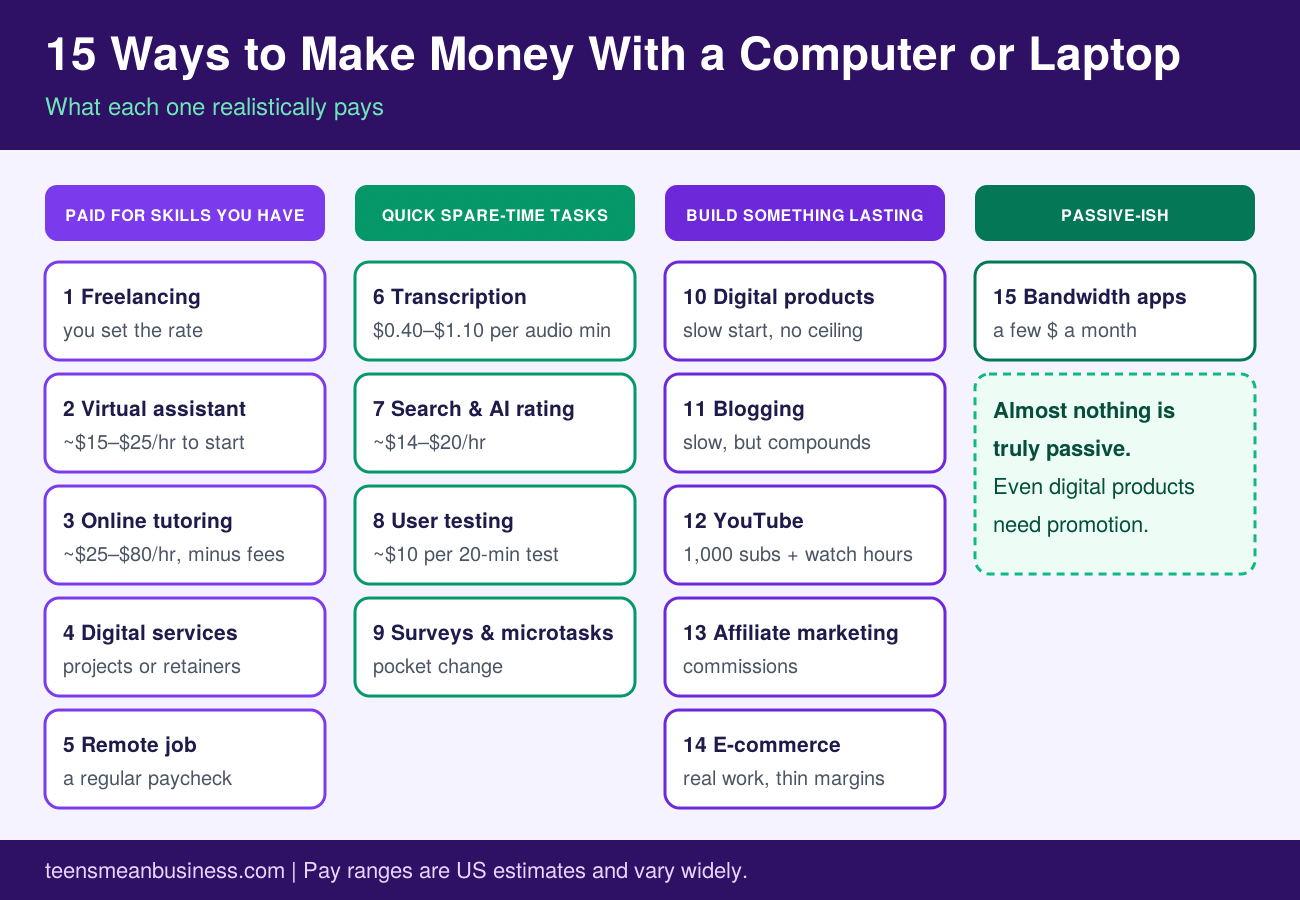
None of these will make you rich by Friday. A few can replace a paycheck. Let’s sort out which is which.
If you can write, design, organize, explain, or code, someone will pay for it. This group is the shortest route from “I have a laptop” to “I have income,” and it’s the one I’d look at first.
Upwork, Fiverr, and Freelancer connect you with clients who need writing, graphic design, programming, translation, video editing, and plenty more. (For a wider list of places to look, see our guide to freelancing) The beauty of it is that a laptop and a decent coffee shop are the whole office.
Your first few gigs will probably pay less than you’d like. That’s the toll. The reviews and portfolio pieces you collect early are what let you raise your rates later, so pick one service, write a profile that says exactly who you help and how, and reply to new job posts quickly. Clients often hire whoever shows up first with a sensible answer. Just remember the platforms take a cut of every payment, and beginner work is crowded.
A virtual assistant (VA, a remote helper for busy people) handles inbox management, calendar wrangling, data entry, research, and social media scheduling, plus the occasional “can you find me a dentist who takes evenings?”
US pay-data sites put typical VA rates around $15 to $25 an hour, and specialists, such as a VA who runs a podcast’s production or a founder’s bookkeeping software, charge well past that. Most clients start you on one small task, so treat it as an audition. And get hours and scope in writing, because some clients want you on call all day for a few hours of pay.
If you can explain algebra, Spanish, or essay structure without making eyes glaze over, tutoring pays well for computer work. Marketplaces like Wyzant and Preply let tutors set their own rates, and listings often run from about $25 to $80 an hour. The platform keeps a share, and new tutors usually start at the low end while reviews build.
Plenty of small businesses know they need a better website, steadier social media, or more people finding them on Google. They just don’t have the hours. If you can handle search engine optimization (SEO, the work of helping a page show up in search results), social media management, email newsletters, or basic web design, you can sell that as a service.
Show proof. A portfolio, even one built from practice projects, beats a long bio. Start with a small, clearly defined package, such as “set up and schedule one month of posts,” and add more when clients ask. Be ready to spend nearly as much time finding clients as doing the work, at least at first.
Freelancing isn’t for everyone. Some people want a schedule, a team, and a paycheck that arrives whether or not a client replied. Remote and part-time roles in customer support, moderation, bookkeeping, research, and software cover that.
FlexJobs, We Work Remotely, and Indeed all carry remote listings. Before you apply, check that the company has a real website and reviews, that the email address matches the company domain, and that nobody asks you to pay anything up front. You trade some freedom for stability, and remote openings attract a lot of applicants, so a tailored application beats a mass-sent one.
These need little or no experience. They also pay accordingly, so go in clear-eyed.
Transcribers turn audio and video into text. Rev, one of the best-known companies, lists pay of $0.40 to $1.10 per audio or video minute for transcriptionists, and captioners start a little higher.
Here’s the part many articles skip. Pay is per minute of audio, not per minute of your time. A tricky recording with mumbling speakers or background noise takes you much longer for the same money, so beginner earnings can land in the single digits per hour. Automatic transcription software keeps improving too, which is why more companies now pay people to correct machine drafts instead of typing from scratch.
Companies hire remote raters to judge whether search results, ads, maps, or AI responses are accurate and useful. Typical US pay runs about $14 to $20 an hour. The old Lionbridge AI business is now part of TELUS Digital, so that’s a name you’ll see on listings, and Welocalize is another.
You’ll need to pass a qualification exam, follow long guideline documents closely, and accept that the work is project-based. Is it steady? When projects run, yes. When they end, the hours can vanish with little warning. Apply only through a company’s own careers page, never through a stranger who contacts you first.
Companies want to know what confuses people on their websites and apps before real customers find out. At sites like UserTesting, you record your screen and talk through what you’re doing, which is a strangely satisfying way to complain about bad menus. A standard test takes about 20 minutes and pays about $10, with live interviews paying more, often $30 to $120.
You’ll typically begin with a practice test, you need a working microphone, and payouts usually arrive by PayPal. Invitations depend on your profile, so some weeks bring plenty and some bring none. Treat it as a side income and join two or three platforms to smooth out the gaps.
Paid surveys, data-entry snippets, and short web tasks (microtasks) are the easiest to start and among the worst paying. Expect pennies to a couple of dollars per task, plus a good number of screen-outs where you spend five minutes only to be told you don’t qualify.
They suit idle moments, like waiting for a download. They don’t suit anyone with an income goal. And never pay to join one.
This is the long game. You put in unpaid hours first, and the earnings, if they come, arrive later and keep arriving.
An ebook, a printable planner, a spreadsheet template, a Notion dashboard, a set of resume templates, a short course. You make it once and sell it as many times as people buy it. Etsy, Gumroad, Teachable, and Amazon’s Kindle Direct Publishing handle payment and file delivery for you.
The hard part is demand. Search the marketplace first, see what already sells, then make something more specific and more useful than what’s there. Our guide to what can i sell to make money may spark ideas. Expect your first listings to sell little or nothing, and plan on improving the product and the listing a few times.
A blog earns through display ads, affiliate links, sponsored posts, and your own products. It also demands patience. A new site needs months to show up in search, and ad income stays small until traffic is steady. Can you stick with it for a year before you see real money? That’s the honest question.
Choose a topic you can write about for a long time, publish consistently, and learn the basics of SEO.
YouTube pays through ads, memberships, and sponsorships, but you have to qualify first through the YouTube Partner Program. Today, the ad-revenue bar is 1,000 subscribers plus either 4,000 qualified public watch hours in the past year or 10 million Shorts views in 90 days. A lower tier opens at 500 subscribers, but that unlocks fan funding and Shopping, not ads.
Timing matters. YouTube announced that, starting February 1, 2027, new applicants will need 8,000 qualified watch hours, or 20 million Shorts views, alongside the same 1,000 subscribers. If a channel is close to today’s bar, that date is worth knowing.
Many channels never reach the threshold, so treat early videos as practice. For topic inspiration, see our guide to YouTube video ideas.
With affiliate marketing, you recommend a product through a special link and earn a commission when someone buys. Amazon Associates, Impact, and Awin are common networks. It works best on a blog, a newsletter, or a video channel where people already trust your recommendations.
Promote only what you’ve actually used, and say clearly that you earn a commission. Disclosure isn’t just polite, it’s a legal expectation in the US. Readers can smell a pitch dressed up as advice, and they don’t come back. You also need an audience first, since commissions mean little without one.
You can open an online store with Shopify or WooCommerce, or sell designs on products that are printed and shipped only after someone orders (print-on-demand). Dropshipping, where a supplier ships straight to your customer, works along similar lines.
Check that any tool you pick is current. Second, margins get thin once you pay for ads, platform fees, and returns. Start with one product, test demand cheaply, and don’t buy inventory on hope. Remember, you’re running a real business, refunds and customer emails included.
Almost nothing is. Even a digital product needs promotion, and a YouTube channel needs uploads. The closest thing to “turn it on and walk away” is the last item, and it comes with a catch.
Apps like Honeygain pay you to share your unused internet connection. They work by routing other people’s traffic through your connection, so this is selling bandwidth, not “renting out your computer’s processing power,” as older articles often put it. A few other services pay for spare graphics-card power, though on a laptop the heat, battery wear, and electricity can eat the earnings.
What does it pay? Honeygain’s own marketing talks up figures like $55 a month with several devices and extra features turned on. Independent reviewers report far less, from a few dollars up to roughly $20 a month on one device, with location making a big difference. There’s also a minimum payout, $20 on Honeygain, so your first cash-out can take a while.
The trade-off is privacy. Other people’s internet traffic is flowing out through your home connection. Read the privacy policy, check what the app limits, and decide whether a few dollars is worth it.
Quietly everywhere. Freelancers use AI tools to draft, research, and clean up work faster. Some clients allow that, some ban it, and some want it disclosed, so read the contract before you lean on it. Pay for easy, generic work in some fields, transcription being the clearest example, has been under pressure from automation.
There’s an upside too. AI has created paid work of its own, like the evaluation jobs in item 7. The safest move is to build a skill that AI makes you faster at rather than one it can fully replace: judgment, niche knowledge, and clear communication.
Usually not. For most of the ideas above, you need a reliable internet connection and a laptop that runs a modern browser without crying. A headset or decent microphone helps if you want to tutor or do user testing.
A few habits matter more than specs:
Anything that promises big money for almost no work is bait. A few red flags come up again and again:
If you can’t verify who’s paying you, don’t hand over bank details or ID.
Usually, yes. In the US, the IRS says you must file a return if your net earnings from self-employment were $400 or more, and income from gig work and side businesses is taxable even when no one sends you a tax form. Keep a simple record of what you earn and what you spend on the work, and set some money aside as you go. This isn’t tax advice, so check the IRS guidance for self-employed people or ask a tax professional. If you live outside the US, your local rules will differ.
Pick based on your situation, not on whichever headline sounds best.
Whichever route you pick, start small, track what you earn, and keep what works. You already own the machine. The only question is what you’ll have it do first.