Physical Address
304 North Cardinal St.
Dorchester Center, MA 02124
Physical Address
304 North Cardinal St.
Dorchester Center, MA 02124

You don’t need more software to grow a small business. You need the right software, and the hard part is telling which is which. Roundups of fifty products rarely explain why any of them made the cut, or what the price does once the free trial stops being free.
If you run a small business, the picks below narrow the field to one or two tools for each core job, with 2026 pricing and, more usefully, the point where each free plan stops being free. Who wants to find out the real price on day thirty-one?
Every tool had to clear four bars: a free plan or trial you can try without a sales call, pricing published in the open, setup a non-specialist can finish in an afternoon, and a sensible next step when your business outgrows it. Prices are US list prices as of November 2026. They move, sometimes twice a year, so treat each number as a starting point and confirm it on the vendor’s pricing page before you pay.
| Category | Top pick | Starting price | Free option? | Best for |
|---|---|---|---|---|
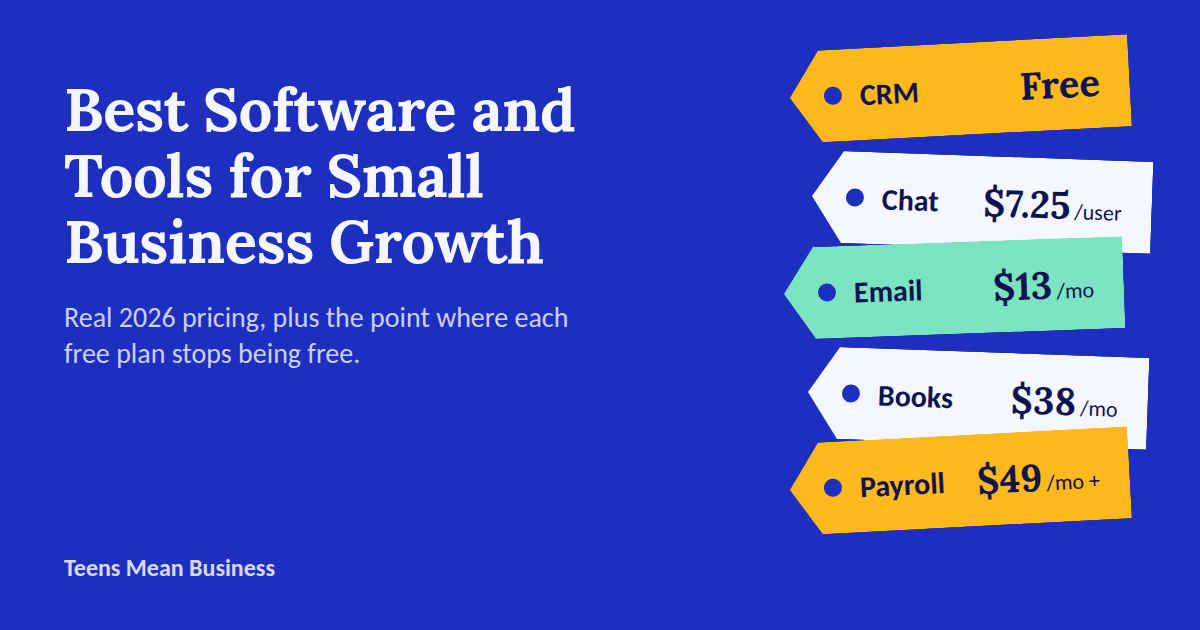
| CRM | HubSpot CRM | Free (2 users); paid from about $15–$20/seat/month | Yes | Tracking leads and follow-ups |
| Accounting | QuickBooks Online | $20/month (Solopreneur); $38/month (Simple Start) | Trial only; Wave has a free tier | Businesses that work with an accountant |
| Payroll and HR | Gusto | $49/month + $6/employee | No | Your first W-2 hire |
| Project management | Asana | Free for very small teams; paid from $10.99/user/month | Yes | Teams of three to ten |
| Team chat | Slack | Free; Pro $7.25/user/month (annual) | Yes | Quick internal conversation |
| Email marketing | Mailchimp | Free (250 contacts); paid from $13/month | Yes, limited | Newsletters and simple campaigns |
| Social media | Buffer | Free (3 channels); paid from $6/channel/month | Yes | Scheduling posts across platforms |
| Website builder | Squarespace | From $16/month (annual billing) | No | A polished site without a developer |
| E-commerce | Shopify | $5/month (checkout-only); $39/month full store | Trial | Selling products online |
| Scheduling | Calendly | Free for individuals; teams from $16/seat/month | Yes | Ending email ping-pong |
| Design | Canva | Free; Pro from $10–$15/month | Yes | Social graphics and flyers |
| Payments | Stripe | Roughly 3% + a small fixed fee per card sale | No monthly fee | Online card payments |
| Security | Bitwarden | Free plan | Yes | Protecting every login above |
Spreadsheets and shared documents are where most small-business customer tracking starts, and they work right up until a follow-up slips. One unanswered email can mean a lost deal, and nothing motivates a software purchase quite like a customer signing with a competitor because nobody replied in time.
A CRM (customer relationship management software, meaning one place for your leads, deals and every conversation you’ve had with them) exists to fix exactly that. Once you pass a handful of contacts, who can keep the names, deal stages and last conversations straight without help? A spreadsheet can’t nudge you when a deal goes quiet.
HubSpot CRM is the obvious starting point, and not only because everyone recommends it. The free plan is real: contact management, a deal pipeline, email tracking and meeting scheduling for up to two users. The limits matter, though. Newer free accounts cap out around 1,000 contacts and one pipeline, and HubSpot’s branding rides along on everything you send. (Older guides promising a million free contacts are out of date.)
Paid seats start at roughly $15 to $20 a month, with the lower number tied to annual billing. The real cliff comes later, when Professional tiers run closer to $90–$100 per seat and add an onboarding fee, so unless you truly need marketing automation, Free or Starter covers most small businesses.
Good: free for real, and easy to learn in an afternoon. Watch out: the price jump after Starter.
If HubSpot’s higher tiers make you wince, Zoho CRM offers a comparable feature set for less, though expect a steeper learning curve.
Bookkeeping is the chore every owner swears they’ll “get to properly,” usually the night before a tax deadline, surrounded by a shoebox of receipts and a rising sense of dread.
The right software takes over the part that used to eat an evening a week: categorizing transactions, reconciling [matching your records against your bank statement], and producing the reports an accountant will eventually ask for, ideally before the deadline rather than during it.
QuickBooks Online remains the industry default, largely because most accountants and bookkeepers already know it cold. The lineup starts with a stripped-down Solopreneur tier at $20 a month for one-person businesses, then Simple Start at $38. Intuit raised prices on its upper tiers (Essentials, Plus and Advanced) again for renewals from August 2026, and sources disagree on the exact figures, so check QuickBooks’ own page before you compare. Payroll is billed separately on top of any plan, so budget for it if you have employees.
Good: your accountant probably already uses it. Watch out: annual price creep.
Wave is the usual answer for owners who want free, but the deal has changed. Its Starter plan still costs nothing for invoicing, estimates, bills and basic bookkeeping. Automatic bank imports, unlimited receipt capture and logins for your accountant, however, now sit behind Wave Pro at $19 a month ($190 a year), and Starter charges 2.9% plus 60 cents on card payments.
Any guide still calling Wave “completely free” is working from old information. It also has no built-in inventory management, so a product business will outgrow it quickly. For a freelancer or a service business, though, Starter can still replace a paid platform.
Once invoices are going out, you’ll also want a plan for the ones that don’t come back; this payment reminder email template helps. For a wider comparison, see our guide to the best small business accounting software.
The day you hire your first W-2 employee is the day payroll stops being optional busywork. It becomes a compliance obligation, with real penalties for missed tax filings, and good intentions don’t file anything on time.
Gusto is the category leader for good reason. It automates federal, state and local tax filings, handles direct deposit, and layers in basic HR tools such as onboarding checklists. The Simple plan runs $49 a month plus $6 per employee, so a ten-person team pays about $109, but it covers single-state payroll only and time tracking is an add-on. Plus ($80 a month plus $12 per employee) adds multi-state payroll, time tracking and next-day direct deposit, which is where you land the moment someone works remotely from another state. Paying only 1099 contractors? Gusto’s contractor-only plan starts at $35 a month plus $6 per contractor.
Good: it files the taxes so you don’t have to. Watch out: the per-employee fee doubles when you move up to Plus.
Somewhere between three employees and ten, two people start doing the same task because neither realized the other had already claimed it. Project management software makes ownership and deadlines visible without a status meeting eating everyone’s afternoon.
Asana has one of the more generous free tiers in the category, with unlimited tasks and projects for a very small team and list, board and calendar views included. Paid plans begin at $10.99 per user per month (billed annually) for Starter, which unlocks timeline views and custom fields. Advanced, at $24.99, adds portfolio-level reporting that larger companies need and most small businesses can happily skip.
Budget-minded teams should also look at Trello and ClickUp, both of which undercut Asana if the extra reporting isn’t a priority.
Good: the free plan goes further than most. Watch out: it’s easy to pay for reporting you will never open.
Email wasn’t built for quick back-and-forth, and most small teams eventually move some of their internal traffic to a chat tool, mostly out of self-preservation.
Slack remains the standard, and its free plan works for small teams with one catch: message history older than 90 days gets hidden, which is exactly when you’ll need to find the decision someone made in February. Pro costs $7.25 per user per month on annual billing ($8.75 month to month), removes that cap and adds unlimited integrations.
Business+ runs $15 per user per month annually and layers on security and compliance features most small businesses won’t need for a while. Already living inside Google Workspace or Microsoft 365? The chat tool you already pay for may be a free substitute worth trying before you add a subscription.
Good: integrations with nearly everything. Watch out: it bills per active user, so every hire raises the invoice.
Is email marketing still worth the effort in 2026? Yes, mostly because it’s the one channel you own. No algorithm update can bury your list the way it can bury your organic reach on a social platform overnight. If you’re new to it, our guides on using email marketing for small businesses and writing email subject lines are good companions to this section.
Mailchimp is still the household name, so go in with clear eyes. Its free plan has shrunk to 250 contacts and 500 sends a month (with a 250-per-day cap), and it no longer includes automation. Essentials starts at $13 a month for 500 contacts, but Mailchimp prices by list size, so 5,000 contacts lands closer to $75, and unsubscribed contacts still count toward your limit. That’s a fair entry point for a small list.
If you’ve outgrown the free plan, compare MailerLite and Brevo, which both tend to offer more room to grow before you pay.
Good: familiar, with plenty of templates. Watch out: cost climbs steadily with your list.
Who has time to post on three platforms every single day? Nobody, which is exactly why scheduling tools exist. Doing it by hand is one of the more tedious parts of running a small business and the kind of repetitive job software was built to remove.
Buffer stands out for a free plan you can actually use: three connected channels and ten queued posts per channel, with an AI writing assistant included at no cost. The Essentials plan, at $6 per channel per month ($5 if billed annually), removes the posting cap and adds analytics. Because Buffer charges per channel rather than per user, it’s a bargain for a solo owner juggling several accounts, though the math flips for larger teams managing many channels, where flat-rate competitors like Hootsuite can end up cheaper.
Good: the free plan is usable. Watch out: cost grows with every channel you add.
If you’re not sure whether your website looks like it’s from 2019, that’s usually your answer. A professional site is table stakes for credibility, and the builder you choose decides how much of the technical work you never think about again (hosting, SSL [the security certificate that puts the padlock in your browser bar], mobile layout) versus how much you’ll be Googling at 10 p.m.
Squarespace is a strong default for owners who want a polished result without hiring a developer. The Basic plan runs $16 a month on annual billing and includes hosting, SSL and core SEO tools, though it can’t process online sales. The Core plan, at $23 a month, removes that restriction and waives Squarespace’s own transaction fees. Wix is the main alternative, with more freedom to customize layouts at a similar price.
Good: clean templates that look finished on day one. Watch out: selling anything means paying for the next plan up.
What happens when your website can’t sell anything? You lose the sale. Selling products online takes infrastructure a general website builder doesn’t provide: inventory tracking, shipping calculations, and a checkout that holds up under real payment volume.
Shopify dominates this category, and its lineup now spans a wider range than it used to. The $5-a-month Starter plan gives you a checkout link only, which is useful for selling through Instagram or TikTok without a full storefront. Basic, at $39 a month, adds a customizable online store with unlimited products and 24/7 support. Grow ($105) and Advanced ($399) mainly buy lower transaction fees and deeper reporting, which pays off only once monthly sales are substantial.
Shopify’s built-in inventory tools cover most small sellers, but a business managing stock across several channels may outgrow them. This guide to inventory management for small business covers dedicated options.
Good: it scales from a side hustle to a warehouse. Watch out: apps and transaction fees add up fast.
How many emails does it take to book one meeting? More than it should, always. The back-and-forth to find a slot that works for both sides is the scheduling equivalent of two people trying to pass each other in a hallway.
Calendly fixes this by letting clients book directly onto your calendar within hours you’ve pre-approved. The free plan supports one event type per user and covers a solo operator’s needs, but it has no shared team workspace. A business where several people take bookings will need the Teams plan, at $16 per seat per month, for round-robin routing [rotating new bookings between team members] and shared reporting.
Good: it removes a whole category of email. Watch out: the free plan is built for one person.
Not every small business can justify a designer, but every one eventually needs a social graphic, a flyer or a simple presentation, usually the night before it’s due.
Canva remains the most practical entry point. The free plan handles basic design with a large template library, and Pro, at $10 to $15 a month depending on billing, unlocks premium templates, a background remover and brand kit tools that keep your materials consistent. If you’re already paying for a stock photo subscription and a separate AI image tool, Canva Pro may replace both for less than either costs alone.
Good: quick results for non-designers. Watch out: everything starts to look like everyone else’s Canva graphic unless you customize it.
Every tool that touches money eventually ends up at a payment processor. Stripe suits online and subscription sales, Square is the natural pick if you also take payments in person, and PayPal is the name customers already trust at checkout. Fees run roughly 3% plus a small fixed amount per card sale across all of them (Wave’s Starter plan, for example, charges 2.9% plus 60 cents), so the smarter question is which processor your store, invoicing tool or accounting software already connects to. Pick that one and you skip a month of copy-and-paste bookkeeping.
One reused password across your CRM, your bank and your email is the cheapest way to lose a business. Bitwarden’s free plan stores your logins and generates strong passwords for each tool above, and 1Password is the more polished paid alternative. Pair either one with two-factor authentication on anything that touches money or customer data. It takes an afternoon, and you’ll never think about it again.
Before you add a standalone AI subscription, check what your existing stack already includes. Buffer’s free plan comes with an AI writing assistant, HubSpot bundles its Breeze AI features into its CRM, and Slack includes basic AI summaries on Pro with fuller AI search on Business+. AI is increasingly sold as a feature inside general business tools rather than a separate product, so the cheapest AI upgrade may be a setting you haven’t switched on yet.
Here is the part most roundups skip. Plenty of the tools above expect an adult on the account. Payment processors such as Stripe and PayPal require the account holder to be at least 18, and many other platforms tuck similar rules into their terms of service. Does that leave a sixteen-year-old with a thriving candle business stuck? Not at all, but the account usually has to sit in a parent or guardian’s name, so have that conversation before you build your whole stack around a tool you can’t open yourself.
Start with free tiers that don’t ask for a credit card: HubSpot’s CRM, Canva, Buffer, Calendly, Slack and Wave’s Starter plan all let you work before you pay. Keep the first three months simple. A spreadsheet for money, a free CRM for contacts and a scheduler for posts is a real operation. Add payroll, a store and a paid email plan only when revenue asks for them.
A few habits matter more than any feature list.
Start with the problem, not the tool. It’s easy to get pulled in by an all-in-one platform’s feature list, but a tool earns its subscription only if it solves a problem you have today, not one you might have someday.
Read the pricing page for the tier above yours. Free and entry-level plans tend to be generous right up to a specific limit (contacts, users, channels) and then the next step is steep. Know the number before you hit the wall.
Weigh integrations as heavily as features. A CRM that doesn’t talk to your email tool, or accounting software that doesn’t sync with your payment processor, creates manual work that erases the time the software was supposed to save.
Price the whole stack, not each tool alone. Picture a five-person shop on QuickBooks Simple Start ($38), Gusto Simple ($79 for five employees), Shopify Basic ($39), Mailchimp Essentials ($13) and Slack Pro for five ($36.25). That lands near $205 a month before payment fees, and none of those line items looked scary on its own.
Take the free trial seriously. Use it to confirm the tool fits how your team works, not just how it looks in a demo, and put a reminder on your calendar before the trial turns into a charge.
Cheapest full stack. HubSpot’s free CRM, Wave Starter, Slack Free, Buffer Free, Calendly Free and Canva Free cover tracking customers, basic bookkeeping, team chat, social posting, booking and design for $0 a month. You’ll pay card-processing fees on sales, and you’ll hit limits as you grow.
Solo business. Skip payroll, project management and team chat until you hire. A CRM, an accounting tool, a scheduler and a design tool are enough for most one-person operations.
When to move off free plans. Upgrade when a specific limit gets in your way, such as a 1,000-contact cap, hidden message history or missing bank imports, rather than because a dashboard nags you.
Do you need all of this? No. Pick the one or two categories that cost you the most time or money this month and fix those first.
There is no single best stack for every small business. A solo consultant and a five-person e-commerce shop need almost entirely different tools. But the categories above cover the operational core nearly every small business meets eventually: a way to track customers, manage money, pay people, organize work and market what you sell. Start with a free or low-cost option in each, upgrade only when a limit gets in your way, and set a calendar reminder before each free trial ends so it never turns into a charge you forgot about.